What Kind of Gaming Performance Can You Get Under 80000?
The under-80000 segment in India has improved dramatically. You can now get a laptop with an NVIDIA RTX 3050 or even RTX 4050 GPU, 16GB DDR5 RAM, and a 144Hz FHD display without stretching your budget. That is more than enough to run most popular titles at 1080p on medium to high settings.
What Games Run Well on These Laptops?
Titles like Valorant, CS2, GTA V, FIFA, Fortnite, and Minecraft run at 60 to 144 FPS comfortably on RTX 3050 laptops. More demanding games like Cyberpunk 2077 or Alan Wake 2 will need medium settings, but they are playable. The RTX 4050 variants in this segment handle demanding titles noticeably better.
One thing to keep in mind: GPU TGP (Total Graphics Power) matters as much as the GPU model itself. An RTX 3050 running at 75W will outperform an RTX 3050 running at 45W in the same game. Always check TGP before buying — we have noted it in every review below.
The Key Specs to Check Before Buying
Look for at least 16GB RAM, a 144Hz display, NVMe SSD storage, and a GPU with a reasonable TGP. Cooling quality also matters a lot for sustained gaming — laptops that throttle under load drop FPS significantly within 20 minutes of gameplay. All five picks below handle sustained gaming without major throttling issues.
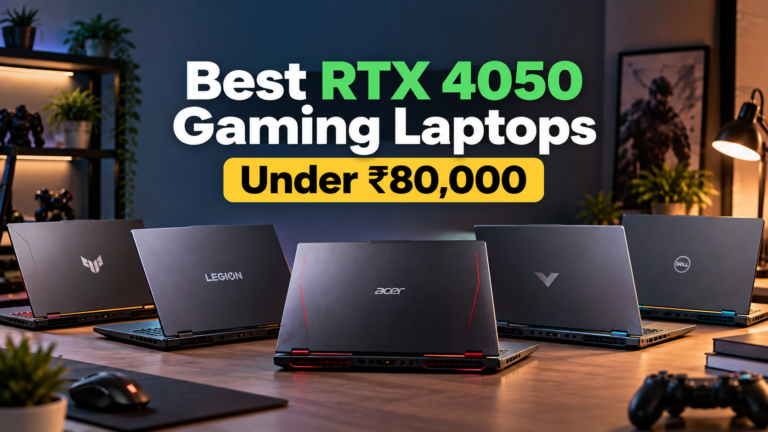
Quick Answer: The best gaming laptops under 80000 in India 2026 are the ASUS TUF Gaming A15 for overall performance, Lenovo LOQ for best cooling and MUX switch, Lenovo LOQ 2024 for budget value, HP Victus 16 for the largest screen with RTX 4050 option, and Acer Nitro 5 for easy upgrades. All five include 144Hz displays, RTX graphics, and at least 16GB RAM.
5 Best Gaming Laptops Under 80000 India 2026 — Quick List
- ASUS TUF Gaming A15 — Best Overall — RTX 3050 75W, Ryzen 7, 16GB DDR5
- Lenovo LOQ (83DV01ABIN) — Best Cooling and MUX Switch — RTX 3050A, Core i5-13450HX
- Lenovo LOQ 2024 (83JC0031IN) — Best Budget Value — RTX 3050 6GB, Ryzen 5, Rs 65,000
- HP Victus 16 — Best Screen Size and RTX 4050 Option — 16.1-inch, 144Hz
- Acer Nitro 5 — Most Upgradeable — RTX 3050 / RTX 4050, Easy RAM and SSD Access
All 5 Gaming Laptops Under 80000 — Specs at a Glance
Use this table to compare every laptop side by side before reading the detailed reviews below.
| # | Laptop | CPU | GPU | RAM | Display | Price | Best For |
|---|---|---|---|---|---|---|---|
| 1 | ASUS TUF Gaming A15 Best Overall | Ryzen 7-7445HS | RTX 3050 75W | 16GB DDR5 | 15.6″ 144Hz | Under 80K | Best all-round |
| 2 | Lenovo LOQ 83DV01ABIN Best Cooling | Core i5-13450HX | RTX 3050A 4GB | 16GB DDR5 | 15.6″ 144Hz | Rs 72,245 | Cooling and MUX |
| 3 | Lenovo LOQ 2024 Best Budget | Ryzen 5 7235HS | RTX 3050 6GB | 12GB | 15.6″ 144Hz | Rs 65,000 | Budget gamers |
| 4 | HP Victus 16 Biggest Screen | Ryzen 5 / Core i5 | RTX 4050 / 3050 | 16GB | 16.1″ 144Hz | Rs 63,990 | Screen and GPU |
| 5 | Acer Nitro 5 Most Upgradeable | Core i5 / Ryzen 5 | RTX 3050 / 4050 | 16GB | 15.6″ 144Hz | From Rs 35,000 | Upgrade path |
1. ASUS TUF Gaming A15 — Best Gaming Laptop Under 80000 Overall
The ASUS TUF Gaming A15 is the strongest all-round gaming laptop under 80000 in India right now. It pairs an AMD Ryzen 7-7445HS with an RTX 3050 running at a full 75W TGP — which is significantly more powerful than the 45W or 50W RTX 3050 found in cheaper alternatives. The battery life is also exceptional for a gaming laptop at this price.
ASUS TUF Gaming A15 (FA506NCG-HN199W)
Best Overall · RTX 3050 75W · Ryzen 7-7445HS · 16GB DDR5 · 144Hz · Best BatteryWhy 75W TGP Makes a Real Difference in Gaming
The RTX 3050 in the TUF A15 runs at 75W TGP, which is noticeably more powerful than the same GPU running at 45W in budget competitors. In practice, this means better frame rates in demanding games and less aggressive throttling during long sessions. Valorant runs at 140 to 144 FPS, GTA V at 80 to 100 FPS, and FIFA at consistent 144 FPS at high settings.
Battery Life — Unusually Good for a Gaming Laptop
Most gaming laptops die within 3 to 4 hours on battery. The TUF A15 holds up significantly better thanks to AMD’s efficient Ryzen 7 architecture. This makes it a practical choice for students who want to game on the go without hunting for a power outlet every two hours.
Build Quality and Cooling
The TUF series carries MIL-SPEC build quality, which means it survives real-world drops, dust, and humidity better than most gaming laptops at this price. The dual-fan cooling system with self-cleaning design keeps temperatures in check during extended gaming sessions without becoming unbearably loud.
Pros
- RTX 3050 at full 75W TGP for best performance
- AMD Ryzen 7-7445HS is fast and efficient
- 16GB DDR5 RAM — latest generation
- Excellent battery life for a gaming laptop
- MIL-SPEC durable build quality
- Top test scores in this price segment
- 144Hz display for smooth gameplay
Cons
- Display color accuracy is average
- No MUX switch on this model
- Fan noise is noticeable under full load
- Limited port selection vs competitors
2. Lenovo LOQ (83DV01ABIN) — Best Cooling and MUX Switch Under 80000
The Lenovo LOQ stands out for two things that most budget gaming laptops skip: Hyperchamber cooling and a MUX switch. These are features you typically see on more expensive gaming laptops. At Rs 72,245, the LOQ brings them into the under-80000 segment without sacrificing core gaming specs.
Lenovo LOQ (83DV01ABIN)
Best Cooling · MUX Switch · Core i5-13450HX · RTX 3050A · 16GB DDR5 · 144HzWhat is a MUX Switch and Why Does It Matter?
A MUX (Multiplexer) switch lets you bypass the integrated GPU and send the display output directly through the NVIDIA RTX GPU. This results in a 10 to 15 percent FPS boost in most games without any hardware upgrade. Budget gaming laptops without a MUX switch waste GPU performance routing frames through the iGPU first. The LOQ gives you this feature at under 80000, which is genuinely impressive.
Hyperchamber Cooling — Sustained Performance Under Load
Lenovo’s Hyperchamber cooling design routes airflow more efficiently than standard dual-fan setups. In extended gaming sessions of 30 minutes or longer, the LOQ maintains CPU and GPU temperatures better than the Acer Nitro 5 and IdeaPad gaming alternatives. Lower temperatures mean fewer FPS drops over time, which matters in competitive gaming. The Intel Core i5-13450HX also contributes here — it is a strong multi-core processor with a 10-core configuration that handles CPU-heavy titles well.
Pros
- MUX switch for 10 to 15 percent FPS boost
- Hyperchamber cooling for sustained performance
- Intel Core i5-13450HX is a strong processor
- 16GB DDR5 RAM standard
- 144Hz FHD display at 300 nits
- Solid Lenovo build quality
Cons
- RTX 3050A is weaker than standard RTX 3050
- Priced higher than some RTX 3050 competitors
- Battery life shorter than TUF A15
- No per-key RGB lighting
GPU TGP — The Hidden Spec That Determines Real Gaming Performance
Two laptops can both say “RTX 3050” on the box but deliver very different gaming performance. The difference comes down to TGP (Total Graphics Power). An RTX 3050 at 75W runs significantly faster than the same GPU at 45W. Always check the TGP in the full specifications before buying any gaming laptop under 80000.
The ASUS TUF A15 in this guide runs the RTX 3050 at a full 75W. The Lenovo LOQ 2024 uses a 6GB RTX 3050 which compensates with more VRAM. The HP Victus 16 has variants with RTX 4050, which outperforms all RTX 3050 configurations regardless of TGP. Keep this in mind when comparing prices across the five laptops.
3. Lenovo LOQ 2024 (83JC0031IN) — Best Value Gaming Laptop Under 70000
At Rs 65,000, the Lenovo LOQ 2024 gives you military-grade build quality, a 6GB RTX 3050, and a 144Hz display well under the 80000 ceiling. The extra VRAM on the RTX 3050 6GB variant helps in newer titles that demand more video memory. It is the smartest buy if you want to leave budget for a gaming mouse and headset.
Lenovo LOQ 2024 (83JC0031IN)
Best Budget Value · RTX 3050 6GB · Ryzen 5 7235HS · 144Hz · MIL-SPEC Build · Rs 65,000RTX 3050 with 6GB VRAM — Why More VRAM Matters
The standard RTX 3050 comes with 4GB VRAM. The LOQ 2024’s 6GB variant handles newer game textures, open-world environments, and modded games noticeably better at high settings. Games like Hogwarts Legacy and Elden Ring benefit from the extra VRAM headroom in ways that 4GB configurations cannot match.
Military-Grade Durability at Rs 65,000
The LOQ 2024 passes military durability standards, which is unusual at this price point. For students and young gamers who carry their laptop daily, this build quality provides genuine long-term value. The downside is 12GB RAM instead of 16GB — but RAM is upgradeable on this model, so you can add an 8GB stick later for around Rs 2,000 to 3,000.
Pros
- RTX 3050 with 6GB VRAM — more than standard
- Military-grade build quality at Rs 65,000
- 144Hz IPS display for smooth gameplay
- Ryzen 5 7235HS handles gaming well
- Leaves budget for accessories
- RAM upgradeable after purchase
Cons
- 12GB RAM instead of 16GB out of box
- Ryzen 5 less powerful than Ryzen 7
- No MUX switch on this model
- Display brightness average at 300 nits
4. HP Victus 16 — Best Screen Size and RTX 4050 Gaming Laptop Under 80000
The HP Victus 16 offers the largest display in this guide at 16.1 inches, and some variants include the RTX 4050 — a GPU that is a full generation ahead of the RTX 3050. At Rs 63,990 for base variants, the Victus 16 is excellent value if you find the RTX 4050 configuration within the 80000 budget during a sale.
HP Victus 16
Biggest Screen · RTX 4050 Option · 16.1-inch 144Hz · Effective Cooling · Rs 63,990 onwards16.1-Inch Display — More Immersive Gaming
Gaming on a 16.1-inch screen is noticeably more immersive than 15.6-inch alternatives, especially for open-world games and racing titles. The 144Hz FHD panel delivers smooth gameplay and the larger viewport helps in competitive games where spotting enemies at screen edges matters. For FPS games, this screen size advantage is real.
RTX 4050 Option — When You Can Find It in Budget
The RTX 4050 is roughly 30 to 40 percent faster than the RTX 3050 in most gaming benchmarks. If you find a Victus 16 RTX 4050 variant under Rs 80,000 on sale — which happens regularly on Amazon and Flipkart — it is arguably the best gaming performance per rupee available in this entire guide. HP’s thermal management on the Victus 16 handles the RTX 4050 reliably during extended gaming without severe throttling.
Pros
- Largest 16.1-inch 144Hz gaming display
- RTX 4050 variant available for best GPU
- Effective dual-fan thermal management
- 16GB RAM standard across variants
- Good value at Rs 63,990 base price
- HP build quality and after-sales support
Cons
- Heavier due to larger 16.1-inch chassis
- RTX 4050 variant may exceed 80000
- Average battery life at 3 to 4 hours gaming
- Display brightness could be higher
5. Acer Nitro 5 — Most Upgradeable Gaming Laptop Under 80000
The Acer Nitro 5 is the most user-friendly gaming laptop to upgrade in this price range. It comes with easy-access RAM and SSD slots that let you expand your storage and memory without any technical expertise or voided warranty. It is also the widest-ranging laptop in this guide — available from Rs 35,000 in older configurations all the way to 80000 with newer GPU variants.
Acer Nitro 5
Most Upgradeable · RTX 3050 / RTX 4050 · Easy RAM and SSD Access · 144Hz · Wide Price RangeWhy Upgradeability Matters for Gaming Laptops
Most gaming laptops become slow not because of the GPU, but because RAM fills up or the single SSD gets fragmented over time. The Nitro 5 lets you add a second SSD, upgrade from 16GB to 32GB RAM, and replace the primary SSD yourself with basic tools. This extends the laptop’s useful gaming life by 2 to 3 years compared to sealed alternatives. Long-term, it is one of the best investments you can make in a gaming laptop under 80000.
Wide Range of Configurations — Find Your Budget
Older Nitro 5 models start from around Rs 35,000 (refurbished or older stock), while newer configurations with RTX 4050 sit near the 80000 ceiling. This flexibility means you can pick the configuration that fits your exact budget. The RTX 4050 Nitro 5 variants under 80000, when available, offer strong gaming performance alongside the upgrade path advantage.
Pros
- Easiest RAM and SSD upgrade in this guide
- Wide configuration range from 35K to 80K
- RTX 4050 variants available
- 144Hz FHD display for smooth gaming
- 4.5-star community rating with 53 reviews
- Good port selection on all variants
Cons
- Build quality slightly below TUF and ThinkPad class
- Fan noise noticeable under gaming load
- Battery life is average at 3 to 4 hours
- Older models may have slower DDR4 RAM
How to Choose the Right Gaming Laptop Under 80000
Before buying, match your gaming habits and priorities to the right laptop. Here is a quick breakdown based on what matters most to different types of gamers.
Best Overall Performance
ASUS TUF Gaming A15. The 75W RTX 3050 and Ryzen 7-7445HS deliver the best all-round gaming performance in this price range. Battery life is a bonus for gamers who also use their laptop for work or study.
Competitive Gaming and FPS
Lenovo LOQ (83DV01ABIN). The MUX switch gives you a 10 to 15 percent FPS improvement in competitive titles. Hyperchamber cooling keeps performance consistent over long sessions. Important in titles like Valorant and CS2 where every frame counts.
Tight Budget Under 65000
Lenovo LOQ 2024. Military-grade build, 6GB RTX 3050, and a 144Hz display at Rs 65,000. Upgrade the RAM from 12GB to 16GB later for a complete gaming setup that punches well above its price.
Immersive Single-Player Gaming
HP Victus 16. The 16.1-inch display makes open-world and story-driven games noticeably more immersive. Target the RTX 4050 variant on sale for the best gaming experience in this entire guide under 80000.
Long-Term Investment
Acer Nitro 5. Easy RAM and SSD upgrades extend the laptop’s gaming life significantly. Buy the best configuration you can afford now, then upgrade storage and RAM as your budget allows over the next two years.
Students Who Also Game
ASUS TUF A15 or Lenovo LOQ 2024. Both handle coding, productivity, and gaming well. The TUF A15 has better battery life for campus use while the LOQ 2024 saves Rs 15,000 for accessories, a gaming mouse, or headset.
Frequently Asked Questions — Gaming Laptops Under 80000 India
Which is the best gaming laptop under 80000 in India in 2026?
Is RTX 3050 good for gaming under 80000?
Which gaming laptop has the best cooling under 80000?
Can I upgrade the RAM and storage in gaming laptops under 80000?
What is a MUX switch and which laptops under 80000 have it?
Which gaming laptop under 80000 is best for students?
Should I buy RTX 3050 or RTX 4050 gaming laptop under 80000?
❤️ You May Also Like
More home appliance and buying guides for Indian homes